Tools Configuration
Tools let your agent take actions during a conversation, not just talk. While the agent prompt (the instructions that tell your agent what to say) decides what to say, tools decide what to do: transfer a call, end a session, call an external API, or book an appointment.
This tab is disabled until you write an Agent Prompt in the Agent Behaviour tab.
How Tools Work
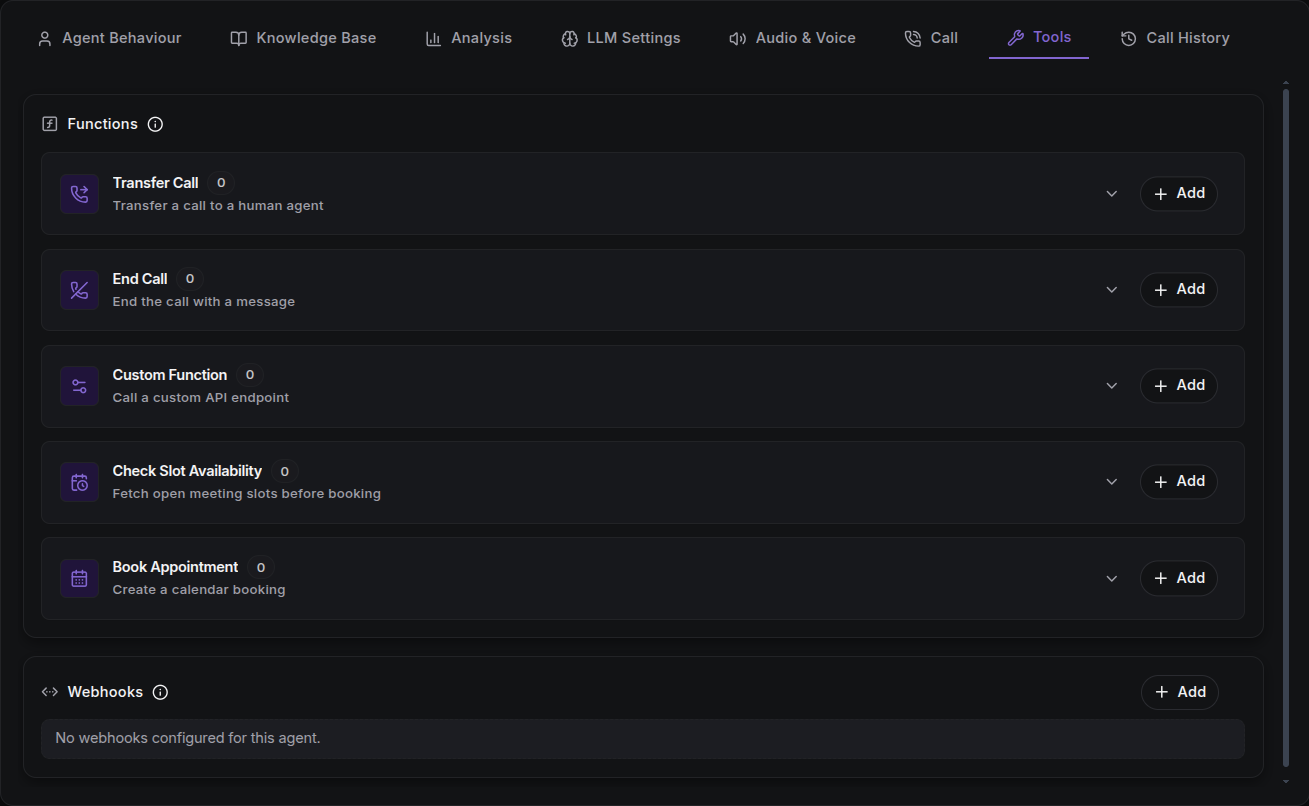
Tools are created once on the Tools page, then attached per agent here. ScaleAI supports five tool types:
| Tool | Purpose |
|---|---|
| Transfer Call | Transfer the current call to a human agent, with warm/cold handoff options. |
| End Call | End the call with a closing message. |
| Custom Function | Call an external API on your backend. |
| Check Slot Availability | Fetch open meeting slots before booking. |
| Book Appointment | Create a calendar booking. |
A tool runs only when the agent decides it is relevant. Your prompt decides when a tool fires.
The Functions Section
The Functions area lists attached tools grouped by type. Each group is an expandable accordion:
- Add lets you either attach an existing tool (searched from your workspace) or create a new one inline.
- Each attached tool shows its type, name, and a summary (e.g. transfer destinations, endpoint, or provider).
- Use the toggle to enable/disable a tool, the pencil to edit it, and the trash to detach it from this agent.
- Tools you create here are saved to your workspace and become reusable across other agents.
Function Call Sound
Transfer Call, Custom Function, Check Slot Availability, and Book Appointment tools support a background sound played while the function executes. As with ambient sound, you can enable it and choose a sound type and volume to make the action feel natural.
Cancel on Interruption
Most tools offer a Cancel on Interruption option. It aborts the tool's execution if the caller speaks again mid-action.
Tool Types in Detail
Transfer Call
Transfers the live call to one or more destination numbers. Configure:
- Destinations: a phone number or SIP URI per target.
- Phone target: transfer number, optional extension (digits,
*,#) and extension duration, and a prompt the agent reads before handing off. - SIP target: SIP URI and SIP trunk selection.
- Phone target: transfer number, optional extension (digits,
- Transfer Mode:
warmplays a warm-handoff message while connecting;colddrops the line and dials. - Warm Handoff: optional message spoken before handing off, and the language it's spoken in.
- Pre-Execution Message: spoken to the caller before the transfer begins.
- Cancel on Interruption: abort the transfer if the caller speaks again.
End Call
Ends the call gracefully. Configure a name and a prompt describing when the conversation is complete; the agent uses it to decide whether to hang up.
Custom Function
Calls an external endpoint mid-conversation, e.g. to look up an order or write a record. Configure:
- Name: a snake_case identifier.
- API Endpoint or cURL: HTTP method (
GET,POST,PUT,DELETE,PATCH) and URL. You can paste a cURL command and the fields populate automatically. - Timeout (ms): between
1000and120000. After this, the call proceeds without the result. - Prompt: instructions describing when to execute this function.
- Authorization: optionally reuse a saved Integrations credential instead of hardcoding secrets.
- Headers & Query Parameters: key/value pairs, supporting
{{dynamic_variables}}. - Parameters: a structured schema (with nested objects/arrays) describing the request body.
- Dynamic Variables: placeholders detected from headers, query params, and parameters, each with a declared type and required flag.
- Pre-Execution Message: spoken to the caller before the request fires.
- Cancel on Interruption: abort the call if the caller speaks again.
Check Slot Availability & Book Appointment
The two appointment tools pair together: check for an open slot, then book it. Both configure:
- Provider: a calendar integration (e.g. Google Calendar, Calendly).
- API Key: a saved credential for that provider (created inline if needed).
- Event Type: the specific event type to check/book.
- Timezone: the timezone used for availability windows.
- Pre-Execution Message: spoken before the action.
- Cancel on Interruption: abort if the caller speaks again.
Webhooks
Below Functions, the Webhooks section lets you send call lifecycle events for this agent to your own endpoint URL.
- Create a webhook with a target URL and one or more event types.
- Webhooks here are scoped to this agent only.
- Use the toggle to pause/resume delivery and the trash icon to delete.
Managing Tools
Tools are also managed on the standalone Tools page, where you can easily view, create, and filter every tool in your workspace before attaching them to an agent.
The Tools list supports search, per-type filtering (e.g. show only transfer_call), and archive toggles. Archived tools stay in your workspace but are not offered to agents by default.
API
Tools are managed under /function-tools:
POST /function-tools- create a toolGET /function-tools- list toolsGET /function-tools/{id}- fetch onePATCH /function-tools/{id}- update
Refer to the API Reference for request/response schemas.
Next Steps
- Integrations: save the credentials a Custom Function or appointment tool reuses.
- Agent Prompt: reference your tools in the prompt so the agent knows when to call them.
- Test the Agent: practice a tool-enabled agent on a real call.