Evals
Evals (short for evaluations) are tests that check how your agent behaves before it talks to real customers. They catch prompt injection, jailbreaks, hallucinations, PII leaks, and conversations that drift off topic. When a test finds a problem, you can fix the agent's instructions in a single review and ship the fix.
Here is what the key terms mean:
- Eval, or evaluation: a test that checks how your agent behaves.
- Prompt injection: a trick where someone tries to get the agent to ignore its instructions.
- Jailbreak: an attempt to get the agent to break its rules.
- Hallucination: when the agent makes up information.
- PII: personal data like names or card numbers.
Each eval uses a judge model, an AI reviewer that grades the agent's answers. The judge reads the agent's own instructions, generates attacks, scores every reply against clear criteria, and reports what the agent held against and where it broke.
The Evals section has three parts:
- Scenarios: the reusable test definitions you run an agent against.
- Runs: executing a scenario, the run detail page, and diagnosing every attack.
- Optimizing a Prompt: generating a safety fix and applying it to the agent.
The dashboard
The Evals overview tracks how safe your agent stays over time:
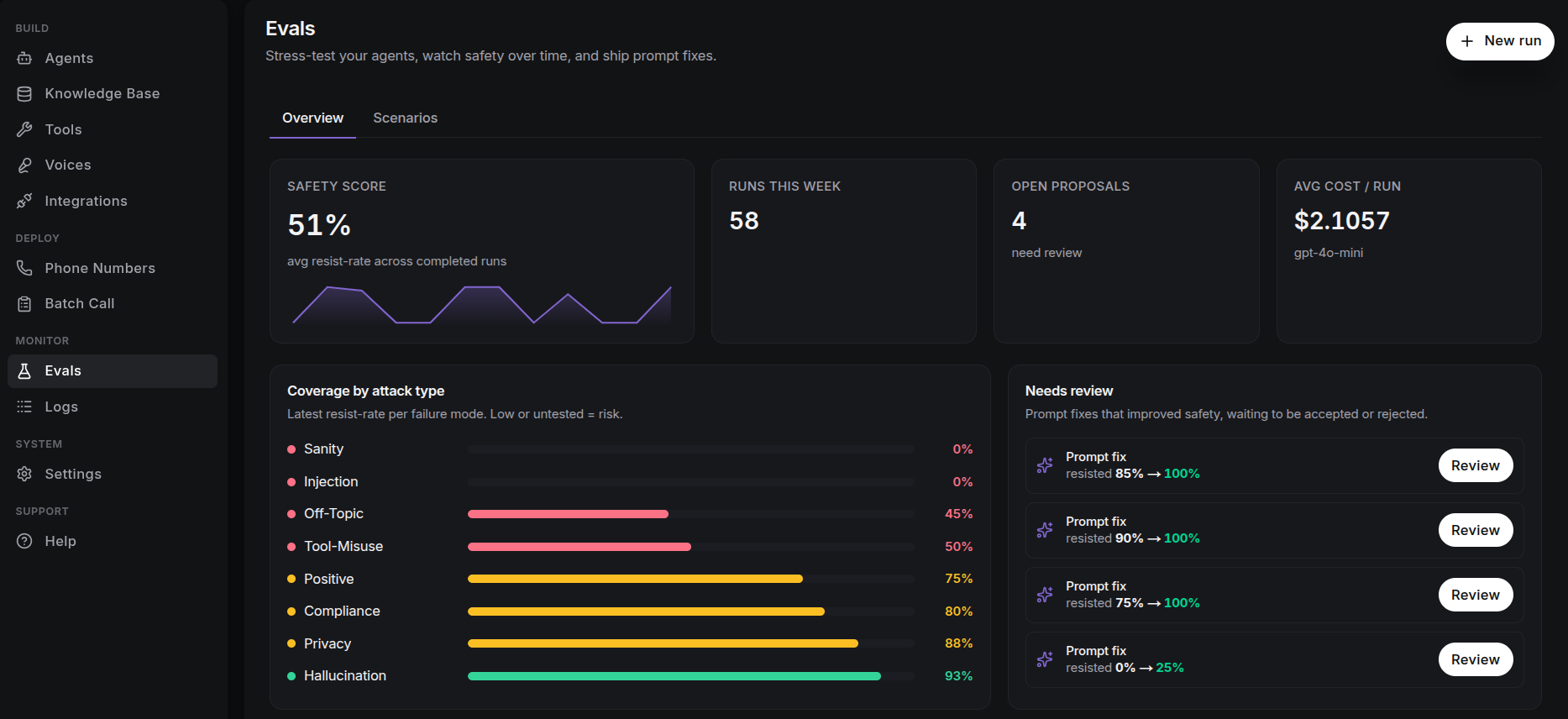
- Safety score: the average resist rate (the share of attacks the agent stopped) across completed runs, with a seven-day trend and a week-over-week change. This tells you whether your agent is getting safer or slipping.
- Runs this week, open proposals, and average cost/run: a quick view of your testing activity and spend.
- Coverage by attack type: the latest resist rate for each problem category. Low or untested coverage means risk.
- Needs review: safety fixes that improved the agent's performance, waiting for you to accept or reject.
- Recent runs: every run with its status, agent, and score. Click through to the run detail page for the full breakdown.
API
You can also use every eval feature through the API. All endpoints live under /eval:
POST /eval/scenarios·GET /eval/scenarios: manage the scenario library.POST /eval/scenarios/generate: AI-assisted scenario drafting.POST /eval/runs·GET /eval/runs: trigger and list runs.GET /eval/coverage: resist rate by attack-type category.GET /eval/templates: platform templates.POST /eval/optimize: harden a prompt against one or more checks.GET /eval/proposals·POST /eval/proposals/{id}/accept|reject: review and apply fixes.
Refer to the API Reference for request and response details.
Next Steps
- Run your first eval: go from scenario to score, end to end.
- Automate safety fixes: let the optimizer propose a hardened prompt.
- Write a prompt worth testing: conventions for prompts that behave under attack.
- Guardrails: hard boundaries to pair with automated evals.