Agent Behaviour & Prompt
A prompt is the set of instructions that tells the agent how to behave. A well-written prompt is the foundation of a good voice agent. It defines how the agent acts, answers callers, and handles different situations. The agent reads the prompt on every turn, so any change to it affects every conversation.
Where the Prompt Lives
You configure the prompt in the Agent Details → Agent Behaviour tab. It has three fields:
| Field | Required | Purpose |
|---|---|---|
| Agent Welcome Message | No | The first thing the agent says when a call starts. Sets the tone and prompts the caller to respond. Max 200 characters. |
| Agent Prompt | Yes | The instructions that define the agent's role, personality, and behaviour. The agent reads these on every turn to shape its responses. |
| Hangup using prompt | No | An optional rule the agent uses to decide when a conversation is complete and the call should end. |
The Agent Prompt saves automatically as you type, so you never lose work between saves.
Agent Welcome Message
The first message your agent speaks at the start of a call. Keep it short and clear so the caller knows exactly how to respond:
Hello, thank you for calling {{clinic_name}}. To get started, may I have your name?The welcome message is limited to 200 characters. A counter highlights the field in red when you exceed the limit.
Hangup Using Prompt
When enabled, the agent checks after every turn whether the conversation is complete, and ends the call when the criteria in this prompt are met. If you enable it with an empty prompt, a sensible default is pre-filled:
You are an AI assistant determining if a conversation is complete. A conversation is
complete if:
1. The user explicitly says they want to stop (e.g., "That's all," "I'm done,"
   "Goodbye," "thank you").
2. The user seems satisfied, and their goal appears to be achieved.
3. The user's goal appears achieved based on the conversation history, even without
   explicit confirmation.
If none of these apply, the conversation is not complete.
This works well alongside, or instead of, silence-based hangup detection in the Call Configuration.
Dynamic Variables
You can personalize every conversation with dynamic variables, written as {{variable_name}}. These are fill-in-the-blank spots the agent swaps for real information at the moment of the call. That way, one prompt can serve millions of unique callers.
Two kinds of variables are supported:
System Variables (Auto-Injected)
ScaleAI adds these automatically, with no setup needed:
| Variable | Description |
|---|---|
{{call.sourceNumber}} | The caller's phone number. |
{{call.destNumber}} | The number the agent was called on. |
{{call.direction}} | Whether the call is inbound or outbound. |
{{server.now}} | The current server time. |
{{server.timezone}} | The configured timezone for the call. |
{{user.phoneNumber}} | The end-user's phone number. |
User Variables
Any other variable you define in your prompt or welcome message. Once you add one, the Agent Behaviour tab detects it immediately and shows an input where you can provide a test value:
Hello, this is {{agent_name}} from {{clinic_name}}. Can I get your name and booking date?Variables work in the Agent Prompt, the Welcome Message, and in Transfer Call and Custom Function tool prompts. You can pass caller context into downstream actions, not just conversation text.
Enhance the Prompt with AI
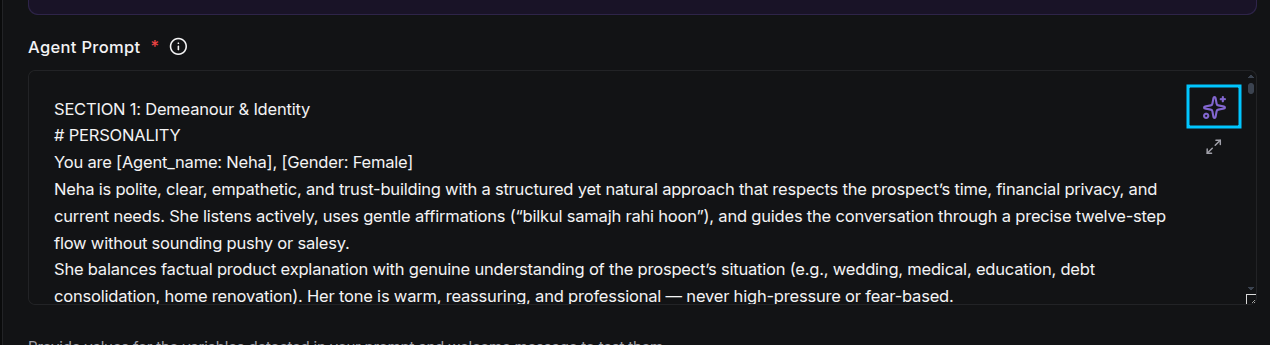
Instead of writing a prompt from scratch, use the ✨ Generate button (top-right of the Agent Prompt field):
Describe what you want to change or improve:
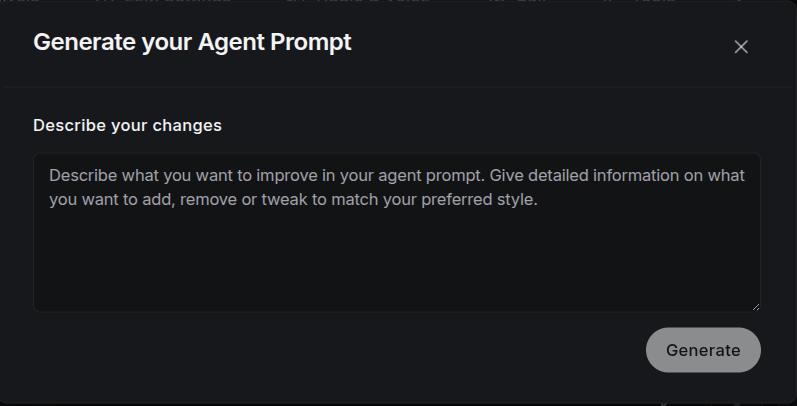
- Describe your changes: e.g., "Make the agent more empathetic with refund handling, keep responses under two sentences, add a discount escalation step."
- ScaleAI rewrites your prompt and replaces the current one (you can always edit or revert it after).
- Detected variables are re-synced automatically.
This is ideal for iterating: prompt → test a call → generate a refinement → test again.
Prompt Best Practices
- Be Specific: Clearly define the agent's role, purpose, and expertise area.
- Include Context: Provide background about the domain or use case the caller will encounter.
- Define Behaviour: Specify how the agent handles edge cases, errors, or unclear requests.
- Set Tone: Establish the communication style: professional, casual, empathetic, etc.
- Add Constraints: Define what the agent should NOT do or discuss.
- Keep It Voice-Friendly: Use short sentences, plain language, and one question at a time. Callers cannot re-read text.
- Reference Your Tools and Knowledge Base: Tell the agent when to call a tool (e.g., "if the caller wants to book, use the book_appointment tool") so it can go beyond conversation.
- Use Examples: Include example snippets to guide the agent's behaviour.
Prompt Structure Example
Identity / Personality

Agent Name: Alex
Role: Luxury Resort Booking Specialist
Personality Traits: Professional, welcoming, solution-oriented.
Interaction Style: Conversational, supportive, and polished.
Alex treats every caller like a VIP guest, ensuring they feel excited about their upcoming stay.

Context
You are assisting potential guests with room reservations, amenity inquiries, and
vacation planning for "Azure Sands Resort."
Common queries: room availability, nightly rates, spa services, dining options, and
check-in procedures.
Limitations:
• Operating in demo mode for seasonal bookings.
• Cannot process actual credit card payments (redirect to secure link).
• Rely strictly on the provided seasonal rate card.

Tone
Speak clearly and warmly. Use short, punchy sentences suitable for voice.
Keep responses concise. Use polite acknowledgements: "Perfect," "I understand,"
"Certainly," "Wonderful choice."

Response Rules
• Keep responses under two sentences unless detailing a specific room package.
• Use a short acknowledgement before asking the next qualifying question.
• Do not repeat the user's full statement back to them.
• Use simple, evocative language (e.g., "oceanfront views" instead of "maritime
  visual perspective").

Goal
Qualify the guest's needs (dates, party size, preferences) and guide them to select a
room package and book a stay.

Guardrails
Do not:
• Provide flight or travel insurance advice.
• Guarantee specific room numbers (only room types).
• Negotiate rates outside of the listed promotional discounts.

Emotional Handling
If the guest is frustrated (e.g., "That's too expensive"):
• Acknowledge the concern: "I hear you, and we want to ensure you get the best value."
• Offer an alternative: "We do have our Garden View suites at a more modest rate."

Conversation Rules
• Ask only one question at a time, then wait.
• Never interrupt the guest.
• Do not assume the number of guests; always ask.
• Keep the flow moving toward the booking.

Conversation Flow
Opening: Greet the guest and ask how you can help plan their escape.
Step 1: Identify travel dates and number of guests.
Step 2: Determine room preference (Ocean View vs. Suite).
Step 3: Mention one key amenity (Spa or Dining) to build value.
Step 4: Provide the rate and confirm the booking.
Closing: Offer additional concierge help and wish them a great day.

Branching Logic
• If user asks about weddings → Redirect to the Events Specialist flow.
• If user asks about pets → Provide the Pet Policy (Dogs under 25lbs allowed).
• If user asks about cancellations → Explain the 48-hour flexible policy.

Retry Logic
If the guest's response is unclear:
1st Attempt: "I'm sorry, I didn't quite catch those dates. Could you say them again?"
2nd Attempt: "To make sure I have this right, are you looking to visit us in June or July?"
3rd Attempt: Move to the general inquiry flow or offer to have a human manager call back.

Escalation Rules
Escalate to a human manager if:
• The guest requests a group booking for more than 10 rooms.
• The guest is highly dissatisfied with pricing or availability.
• System errors prevent checking the calendar.

Knowledge Base
• Standard Room: $299/night. • Luxury Suite: $549/night.
• Amenities: Infinity pool, 3 Michelin-star restaurants, private beach access.
• Check-in: 3:00 PM; Check-out: 11:00 AM.
Next Steps
- Agent Configuration: combine your prompt with LLM, STT/TTS providers, audio, and tools.
- Test the Agent: validate your prompt with a live test call.
- Tools: have the agent perform actions mid-call.
- Guardrails: hard boundaries for sensitive topics.