LLM Settings
The LLM (Large Language Model) is the AI brain that decides what to say. It powers the agent, handling reasoning, looking up knowledge, and creating responses during a live call.
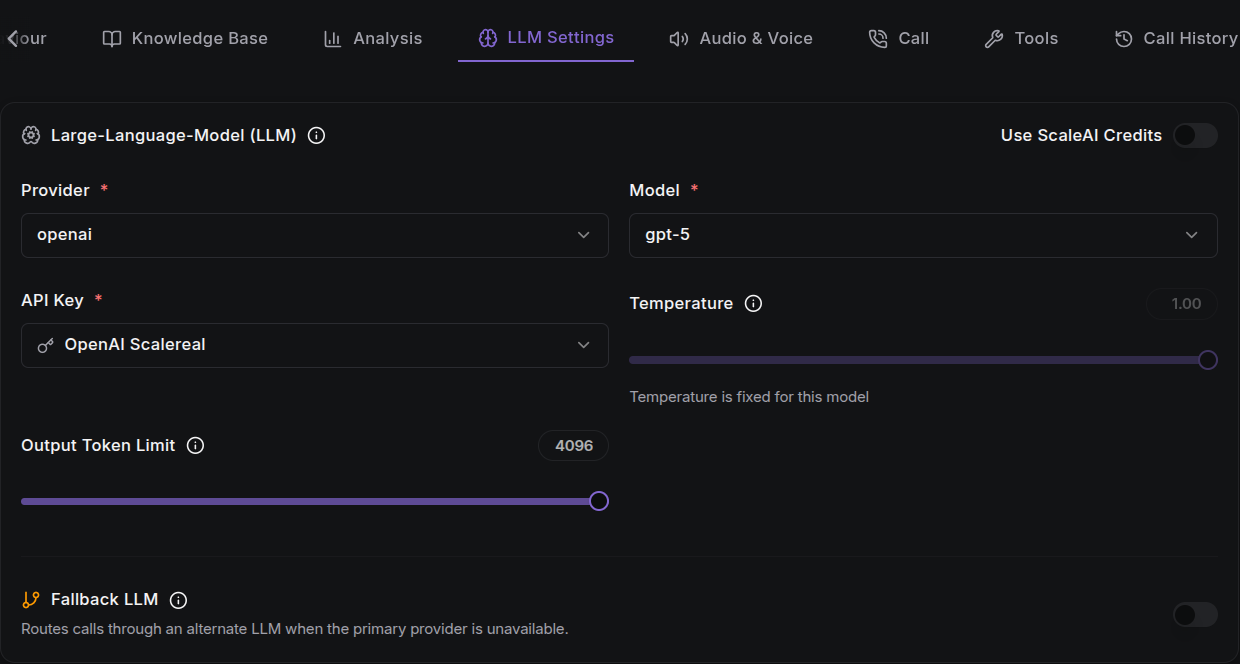
The LLM reads the caller's transcript, follows your agent prompt, uses your connected knowledge bases and guardrails, and decides what the agent should say or do next. Your chosen model directly affects call quality, speed, and cost.
The LLM Settings tab is disabled until you write an Agent Prompt in the Agent Behaviour tab.
Provider & Model
Pick the LLM provider and model that power your agent:
| Field | Required | Description |
|---|---|---|
| Provider | Yes | The LLM service, e.g. OpenAI, Anthropic, Google Gemini, Azure, Cerebras. |
| Model | Yes | The specific model hosted by the provider. |
Model rows show useful details to help you choose:
- Latency: how quickly the model responds (e.g.
0.9s). - Price: estimated cost per minute of use.
- Tags: capability labels (e.g. recommended, multilingual) with colour coding.
Choosing a provider auto-selects its first model. Switching providers resets the model selection.
Model Tuning Fields
Depending on the provider and model, extra fields may appear. These are generated from the provider's setup and can vary by model. Common fields include:
| Field | Type | Description |
|---|---|---|
| Temperature | Slider | Controls how creative the agent is. Higher values give more varied, creative answers; lower values give more focused, predictable answers. |
| Output Token Limit | Number | Caps the maximum tokens generated per response. Tokens are the small pieces of text the model uses to build each answer. |
| API Key | Select | The credential used to call the provider. Only shown when using a custom (non-platform) provider. |
Some fields may be fixed for a specific model. In that case, the UI shows "{field} is fixed for this model" and disables the control.
API Keys
When you're not using ScaleAI platform credits, you must select an API Key credential for the provider. You can create a new credential right from the API Key dropdown, without leaving the agent configuration page.
Use ScaleAI Credits
A "Use ScaleAI Credits" toggle lets you route calls through the platform's managed billing instead of your own provider key. When enabled:
- The provider list switches to the platform-provided default providers.
- The
api_keyfield is hidden. - Your account is billed per-minute for usage.
Platform credits apply per model type. You can use credits for the LLM while bringing your own STT or TTS keys, or mix and match independently.
Fallback LLM
A Fallback LLM section lets you configure an alternate provider and model that takes over if the primary LLM becomes unavailable during an active call.
- Toggle Fallback LLM on, then choose a provider, model, and any fields just like the primary.
- Fallback provider and model selections are stored separately and do not affect your primary configuration.
- If you choose the same provider and model as your primary, the UI warns you to pick a different combination for true redundancy.
Fallback configuration is available for LLM, STT, and TTS. Your agent can survive a single-provider outage at any layer of the stack.
Multiple Knowledge Bases
The LLM can reference multiple knowledge bases linked to a single agent, giving it broader context and more accurate responses. See Knowledge Base & Guardrails for how to attach them.
Next Steps
- Agent Behaviour: understand the full configuration matrix.
- Audio & Voice: configure STT and TTS provider/voice.
- Knowledge Base & Guardrails: give the LLM domain context.
- Test the Agent: validate the LLM's decisions on a live call.