Phone Number Compliance
Submit and manage provider verification required to rent phone numbers.
Some telephony providers require identity or business verification before they can issue a phone number in a particular country or number type. ScaleAI lets you submit and track these provider clearances from Compliance. A clearance is tied to its provider, country, number type, and registration type; it is not a general approval that applies to every number or provider.
The requirements and final decision come from the telephony provider. A clearance in ScaleAI supports number provisioning only. It does not certify your calls, agents, or organization as compliant with laws or regulations.
Provider number verification does not replace your responsibility to meet legal requirements for consent, recording disclosures, privacy, or telemarketing. See Your compliance responsibilities.
When verification is needed
The Buy Number flow tells you when a selected provider and number scope needs an approved verification. You can also open Compliance from the main navigation to see the provider and country combinations currently available for submission.
Requirements depend on the provider, country, number type, and whether you register as a company or individual. The form loads the current fields and document requirements for your selected scope. A Local clearance does not automatically cover Toll-free numbers, and a clearance for one provider or country cannot be used for another.
If no scopes are offered, the countries currently available to your workspace do not need a submission through this page. The provider may still require other account setup outside this workflow.
Submit a verification
- Open Compliance and choose New Verification.
- Select a provider, country, and number type. These choices define the scope of the application.
- If the provider supports more than one registration type, choose Company or Individual.
- Fill in the fields and documents shown for that scope. Follow the provider's labels and help text. Required items must be complete before submission.
- Select Submit for verification. If verification is hosted by the provider, select Continue to [provider] and finish the process on the provider's site.
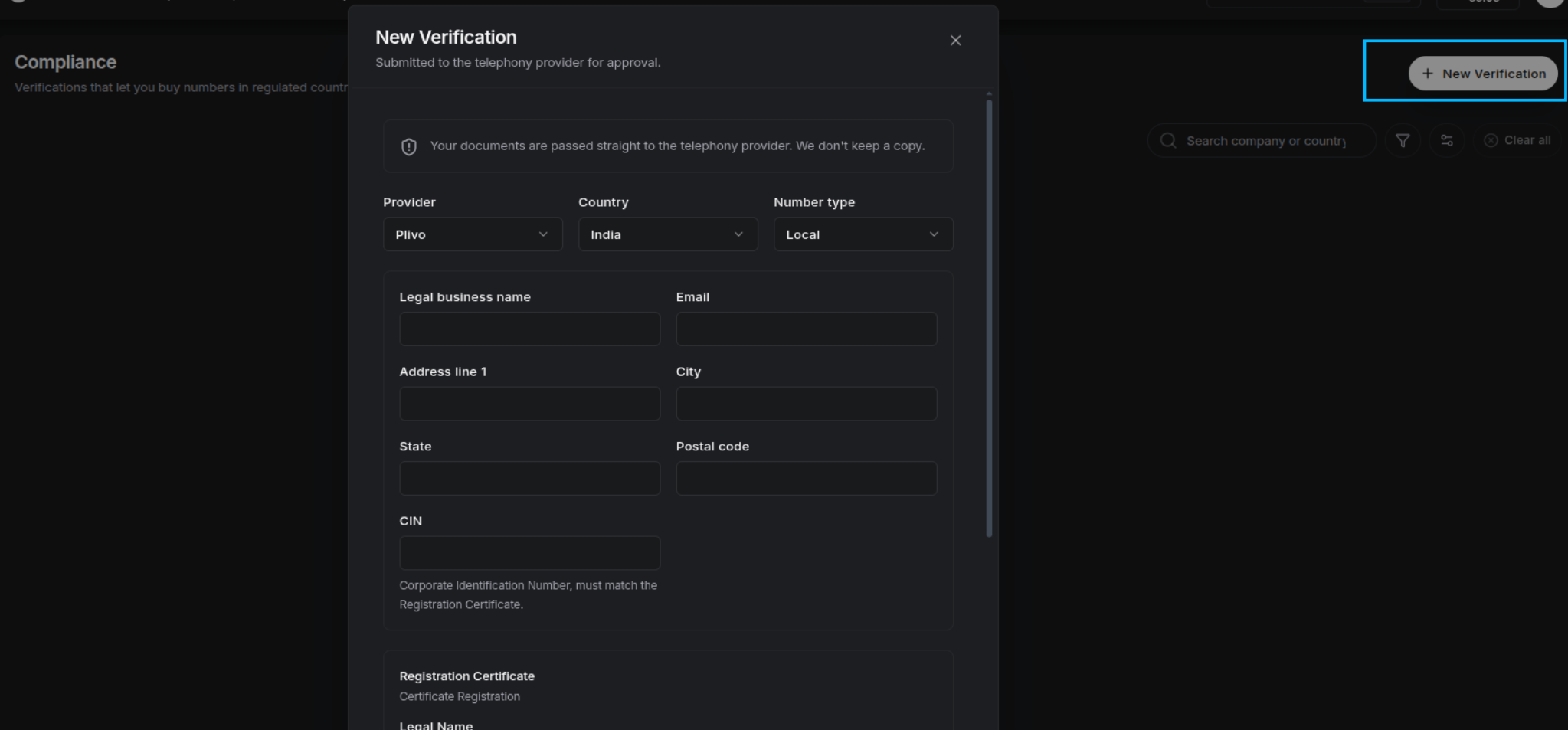
The form accepts the file types and size limits shown beside each upload field. Currently, uploads are limited to 10 MB per file; accepted formats are controlled by the requirement returned for each document. Make sure scans are clear and that entered details match the supporting documents. The provider can reject incomplete, unreadable, inconsistent, or ineligible applications.
Check that the legal name and identifying details match your official documents before submitting. For a rejected application, open its details and use the provider's full reason to guide your corrections.
For direct submissions, ScaleAI sends the supplied documents to the telephony provider and does not retain document copies. The application record keeps the status and limited evidence fields needed to display the verification. For provider-hosted verification, the provider collects and verifies information on its own site. The handoff URL is created for that submission and is not stored, so complete the provider's steps when prompted.
Track and correct submissions
The Verifications list shows the country, number type, provider, registration type, status, submission date, and expiry date when one is provided. Select a row to view details, including the provider's rejection reason, provider reference, and timeline.
| Status | Meaning |
|---|---|
| In review | The provider has received the application and has not approved or rejected it yet. |
| Approved | The provider has approved this scope. It can be selected when buying a matching number, subject to provider availability and any expiry. |
| Rejected | The provider did not approve the application. Open the row to read the reason, then choose Resubmit to correct it. Resubmission stays on the original provider, country, number type, and registration type. |
| Suspended | The provider has suspended the clearance. It cannot be relied on to buy a number while suspended; contact the provider if the reason is not shown. |
| Expired | The clearance is no longer valid for new purchases. Submit a new verification if the provider still requires one. |
| Not started | No provider review has started for this record. Follow any remaining provider steps shown for the application. |
Provider statuses may also appear in the details view. The provider's decision and status are authoritative; processing time varies. ScaleAI cannot approve an application or provide an ETA for the provider's review.
Resubmit a rejected application
Open the rejected verification and read the full reason. Select Resubmit, update the requested information, and attach the required documents again. Documents are not saved for reuse, so upload them again. Resubmission creates a new provider review for the same scope; to apply for a different scope, start a new verification instead.
Remove a verification record
You can remove a verification from the list. Removing it hides the record from the workspace's verification list and it will no longer be available for new purchases. Numbers already bought under that verification continue working, and their audit trail remains. Removing the record does not cancel or release those numbers.
Remove a record only when you no longer need it for future purchases. It will no longer appear as an available clearance in the number purchase flow.
Buy a number with an approved verification
Return to Phone Numbers and start Buy Number. Choose the same provider, country, and number type as the approved clearance. The purchase flow lists matching approved verifications to select. If no verification is available, check that the scope matches and that the record has not expired, been suspended, or been removed.
An approved clearance is necessary where the provider requires it, but does not guarantee that a number is available or that the provider will fulfill a purchase. Number inventory, provider eligibility checks, and pricing are handled at purchase time. See Phone Numbers for purchase and billing details.
Troubleshooting
- The country or provider is missing: Only scopes currently returned as verifiable for your workspace are shown. Check the provider and country selected in Buy Number.
- The form has different requirements than expected: Requirements are provider- and scope-specific and may change. Use the fields and document instructions displayed in the current form.
- The submission is still in review: The telephony provider controls review and timing. Check the verification details for updates or a provider reference to include when contacting support.
- The submission was rejected: Use the full rejection reason in the details view to correct the application, then resubmit. Contact the provider if the reason is unclear.
- The provider's verification page did not open: The submission flow offers an Open action if the browser blocks the new tab. Complete the provider-hosted steps; the handoff link is not retained for later use.
- A clearance is approved but not selectable: Confirm provider, country, and number type match exactly, and verify that the clearance is still approved and has not expired or been removed.
Your compliance responsibilities
You are responsible for determining which rules apply to your organization, calls, and customers, and for obtaining any legal advice or approvals you need. Provider number verification covers that provider's number-issuance requirements for the selected scope. It does not by itself satisfy consent, recording disclosure, privacy, telemarketing, or other obligations that may apply to your use of voice agents.